PresentMGR

Student or teacher? Skip the tour and get set up now.

The Mac-based presentation manager for live events

Make your next show the calm one.

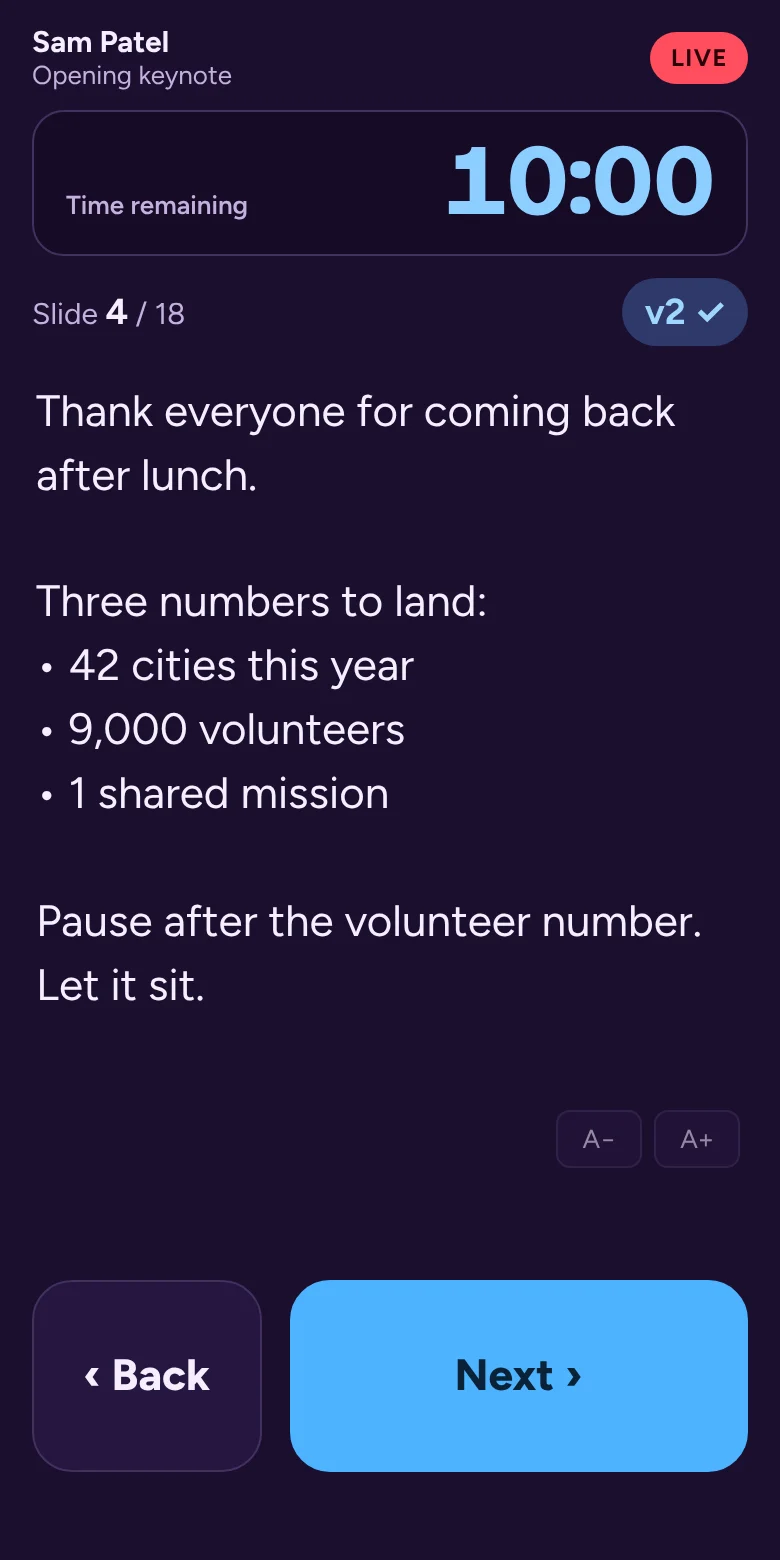
PresentMGR collects every speaker's deck, checks it before show day, lets presenters rehearse from home, and puts each presenter's notes, timer and Next button on their own phone. On show day it runs from one Mac on the venue network, so your show never waits on the Wi‑Fi.

Free during the beta · Runs on a Mac · Works with PowerPoint and Keynote · Built by an event producer

A presenter's phone during a live session: speaker notes in large type, a countdown timer, the version on air marked v2 with a check, and big Back and Next buttons.
Sound familiar?

The show is in four hours. The deck is still changing.

"Which one is final? final_FINAL_v7?"

Decks arrive by email, link and thumb drive. Nobody is sure which version is the one that goes on screen.

"Can you send your slides by Friday?"

You chase twelve speakers across three time zones, then build a spreadsheet just to know who's missing.

"Next slide, please."

The presenter loses their rhythm, the operator guesses the cue, and the room feels every second of it.

"Where are my notes?"

The confidence monitor is across the stage, the notes are on someone else's laptop, and the speaker is on in thirty seconds.

"They're 9 minutes over."

Wrap-up cues get missed when the timer lives on a laptop the speaker can't see.

"The Wi‑Fi just dropped."

Cloud tools are great until a ballroom full of phones takes the network down, right before the keynote.

You make other people look brilliant. PresentMGR is built to take the panic out of that job, so the show feels as calm as it looks from the audience.

How it works

Plan in the cloud. Present from a phone. Run it from one Mac.

Each part of PresentMGR has its own color, so everyone always knows where they are.

PLAN · CLOUD WORKSPACE

Collect everything before the event

  • Build the event: rooms, sessions, running order.
  • Start from a template: conference, panel, awards, pitch day, class or training.
  • Send each speaker a private upload link with calendar invites and automatic reminders. No account needed.
  • Approve the file that goes on screen, lock the schedule, and see who's in, who's missing and what changed.
  • Invite your team to prepare with you.
PRESENT · SPEAKER'S PHONE

Notes and Next, in their hand

  • Rehearse at home first: laptop for the slides, phone as the remote.
  • On the day, speakers scan a QR code. No app to install.
  • Large speaker notes that follow the slides.
  • Their own timer, cues from the host, and a Next button.
  • The version on air is shown, so there's no second-guessing.
RUN · BACK OF HOUSE

A calm show computer

  • One Go Live checklist: computer, files, phones, ready.
  • Opens the right file in PowerPoint or Keynote and starts the slideshow.
  • Take back control any time with one button, or pass the clicker between team members.
  • Runs on the local network. No internet needed during the show.
Before show day

Catch the problems while there's still time to fix them

Everything that usually gets discovered at 7:58 a.m., surfaced days earlier.

Private speaker pages

Each speaker gets their own link: upload, replace, add the dates to their calendar, and see what you approved. Reminders go out by themselves and stop the moment the file arrives.

Automatic deck checks

Every upload is checked for missing speaker notes, 4:3 slides on a 16:9 screen, videos that are linked instead of embedded, and oversized files, with plain-language fixes for the speaker.

Speaker checklist

Collect bios, headshots, the name to show on screen, video and audio needs, clicker preferences and rehearsal attendance in one place.

Approvals and locks

Approve the version that goes on screen, hold late files for review, and lock the schedule or the whole show. Every change is logged, and a morning digest tells you only what's behind.

Rehearse from home

Speakers run through their own deck on a laptop with their phone as the remote, see where their time went, and mark themselves ready, so you know before they arrive.

Your words, your brand

Students and presentations, founders and pitches, facilitators and modules: speakers see your audience's words, in your brand, on every page and email.

Show-day check-in

Speakers tap “I'm here” when they arrive. You see who's in the building, with a number to call for anyone who isn't.

Class and team sign-up

Share one link and let students or trainees form teams or claim a slot themselves. Teammates pass the clicker on stage, phone to phone.

Templates for every format

Conferences, panels and firesides, awards shows, pitch days, class presentations, lecture series and training workshops, each set up the way that format runs.

Every show makes the next one easier

Built to connect the people who present

Speakers, producers and teachers keep running into each other at different events. PresentMGR lets what one of them prepares travel to the next show, so no one starts from zero.

For speakers

A speaker kit that goes with you

Keep your bio, headshot and decks in one free kit. When any show sends you its PresentMGR link, fill in your details and send your deck in one tap.

Make my speaker kit →
For producers

Share the formats that work

Turn a workshop, fireside or pitch night into a template link with its running order, wording, checklist and deadlines. People's details stay out of it. Another producer can start from it in seconds.

Join the Green Room to swap formats →
For classrooms

A class in a minute

Teachers name the class and get one link to share. No account needed to start. Students sign up, upload and rehearse at home, and teams pass the clicker on the day.

Start a class →
Built for Mac

One Mac runs the show. We think that's the right call.

PresentMGR's show computer is a Mac, and we recommend one for every event. When a room full of people is waiting, the show computer has one job: do the same thing, the same way, every time.

  • Reliable through a long show day. macOS is known for running steadily for hours, and you decide when updates happen, so nothing restarts in the middle of a keynote.
  • Stable with PowerPoint and Keynote. PresentMGR drives the apps your speakers built their decks in, so fonts, animations and video play the way they were made.
  • Familiar to iPhone users. Most speakers and crews already live on an iPhone. The Mac feels the same, from the menu bar to AirDrop, so there's less to explain at the tech table.
  • Nothing for speakers to install. Presenters use the phone in their pocket. Any phone with a web browser works.
Show day

Built for the person at the show computer at 7:58 a.m.

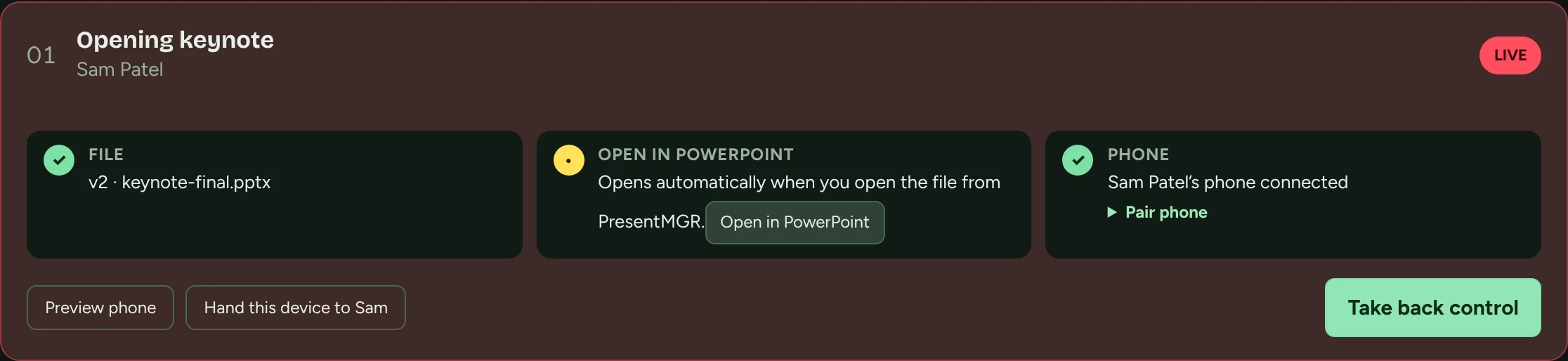
Dark, low-glare screens for the back of the room. Every check you'd do by hand, done in one place.

A live session card: the file (version 2) is checked, it opens in PowerPoint, the presenter's phone is connected, with buttons to preview the phone, hand over a device, and take back control.

Versions you can trust

Every upload is kept. Nothing reaches the screen until you choose it, and a newer upload during a live session is flagged, never swapped in.

Control that survives a refresh

If a presenter's phone reloads or drops off the Wi‑Fi, it gets control back by itself. Only the host can take it away.

Host always wins

Take back control from a bar that never leaves the screen. The presenter can ask for it back with one tap.

Hand over the laptop

No phone? Turn the show computer into the presenter's controls, with an optional PIN to get back.

Speaker timer and cues

Start the clock on Go Live. Send "wrap up" or a custom note straight to the speaker's phone.

Offline by design

Files come down before doors open. If the venue's internet dies, the show keeps going.

Who it's for

For the people who make events run

Event & meeting planners

One place for every deck

Stop living in your inbox. Know who has submitted, what changed, and that the right file will be on screen, without chasing anyone at midnight.

Speaker coordinators

Speakers who feel looked after

Give each presenter a simple link to upload, check what's on air and see their briefing. They walk on stage knowing exactly what to expect.

Show callers & producers

A running order you can trust

Go Live in one step, keep speakers on time with their own timer, and keep host control within reach for the whole show.

Instructors & trainers

Class presentations without the chaos

One sign-up link for the whole class, team uploads with deck checks, rehearsal at home, and teammates passing the clicker on the day, in your school's own words.

Why we built it

Made by people who've stood at the back of the room

I've spent my career producing live and recorded work, and the hardest part of a show is rarely what the audience sees. It's the last-minute deck, the version mix-up, the speaker who can't find their notes, and the minutes lost between presenters.

We built PresentMGR at CFTI to fix that for our own events first. It's built around how real shows run: files change, Wi‑Fi fails, and the host always needs a way to take control. Now we're opening it up to the people who do this work every week, and we'd love you to help shape it.

Roger · Founder, CFTI

The Green Room

Join the community behind the show

The Green Room is where event planners, speaker coordinators and show callers swap what works, and where PresentMGR gets shaped by the people who use it.

  • ★Beta invitations first. Members get early access, starting with people who have an event coming up.
  • ✎Field notes. Short, practical emails: speaker-ready checklists, run-of-show templates and lessons from real shows.
  • ↺A say in the roadmap. Tell us what breaks at your events. We build from what members tell us.
  • ☺Your people. Meetups and a members' chat open once we're big enough to make them good.

Get early access

We'll only use your details to send PresentMGR community emails. Privacy

Questions

The details

Do we need internet at the venue?

Not during the show. Files come down to the show computer ahead of time. On show day, presenter phones connect to the show computer over the venue's local Wi‑Fi. If the internet goes out, the show keeps running.

Which presentation apps does it work with?

PowerPoint and Keynote today, using their native files, so fonts, animations and video play the way the speaker built them. Google Slides and PDF support are next on the roadmap.

What do I need to run a show?

A Mac as the show computer with PowerPoint or Keynote installed, and the PresentMGR app. Presenters use any phone with a web browser. There's nothing for them to install.

Why a Mac?

Because the show computer has to be dependable. Macs are stable over long show days, let you control when updates happen, run PowerPoint and Keynote natively, and feel familiar to anyone who uses an iPhone. Planning in the cloud workspace works from any computer's browser.

Can speakers rehearse before the event?

Yes. From their private page they can run through their own file on a laptop, with their phone as the remote, a timer against their time slot and their speaker notes. You see who has rehearsed and who's marked themselves ready.

Does it work for classes and training?

Yes. Teachers can start a class in a minute at app.presentmgr.com/teach, with no account needed to start. Share one sign-up link and students form teams or claim a slot. Each person gets their own page, and teammates pass the clicker between phones on the day. You can change the words speakers see, like Student, Presentation and Instructor.

Do speakers need an account?

No. Each speaker gets a private link to upload their files, fill in their checklist and rehearse. On show day they scan a QR code to get their notes and controls. Speakers who present often can make a free speaker kit, so their bio, headshot and decks go into any show's page in one tap.

Can I share my show format with another producer?

Yes. From any event, choose Share as template to get a link with the running order, wording, checklist, file rules and deadlines. Files, emails and phone numbers are never included. You can turn the link off at any time.

What happens if a phone loses connection mid-talk?

It reconnects and gets control back automatically. The host can take over at any moment from the show computer, and the presenter can ask to have control back.

How much does it cost?

It's free during the beta. We'll share pricing with Green Room members before anything changes, and beta testers will be looked after.

Who's behind PresentMGR?

PresentMGR is a product of CFTI (Comedy For The Internet Inc.), a production company working across commercial production, media and content.

Every presenter. Every file. Every cue. Handled.

Join the Green Room for early access, field notes from real events, and a say in what we build next.

Join the Green Room